Edit Object=>Text
A Text Object can have multiple lines. You can use special characters and ANSI or Unicode character sets. Characters or series of characters can be printed in sub- or superscript. The text can contain lines, arrows and symbols symbols.
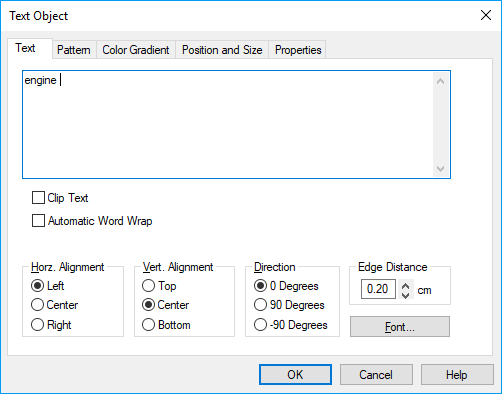
- Text box
- Edit the text in this box. See Text Objects.
- Automatic Word Wrap
If the current word extends the line length (with of the text box), the word will be placed on a new line. Single newline symbols (
"\r\n") will be ignored. Multiple consecutive newline symbols will remain. The word wrap will only take place at blank characters.If the option Automatic Size Update in the dialog page Edit Object=>Position and Size is marked the text box height is calculated automatically.
- Clip Text
- If this option is marked the text is clipped at the text box.
- Align Hori.
- Sets the horizontal text alignment.
- Align Vert.
- Sets the vertical text alignment.
- Direction
- Rotates the text by +90 or -90 degrees.
- Edge Distance
- Sets the distance between the left and upper frame and the text in centimeters.
- Frame
- Click this button to change frame attributes.
- Font
- Click this button to change the font, the font size and other font attributes,
Comment
Text-Objects
In the text of an object you can use special characters and the ANSI or Unicode character sets. Characters or series of characters can be printed in sub- or superscript. Text can contain lines, arrows and symbols. See Text Objects.
Field functions are especially coded strings in text fields. They can be used to update information in documents automatically. They can be used with table or text drawing objects.
Example: The file name is displayed as a text box in a UniPlot document page. If the document is saved under a new name the field is updated and displays the new name.
Solution: Create a text box and type the following text:
@f{documentname}. Instead of the string @f{documentname} the file name
is displayed, e.g. c:\test.ipw.
See also
Edit Object=>Pattern, Edit Object=>Color Gradient, Edit Object=>Position and Size, Edit Object=>Properties
id-697636