Edit Object=>Properties
In this dialog box, the name and other properties of the object can be edited.
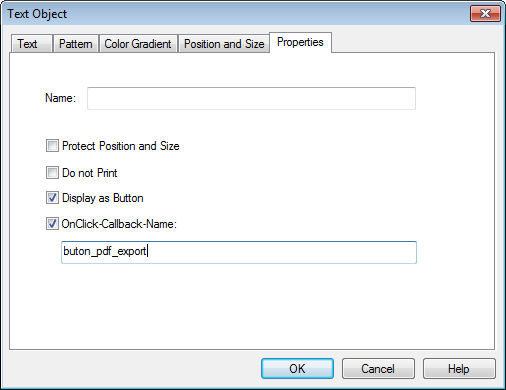
- Name
- The name of the object can be changed in this text field. The name will be displayed when you call up the ObjShow function from the Command Window (View=>Command Window). The name can be used to get the object handle inside an UniScript program using the PageGetObjectHandle function.
- Protect Position and Size
- Protects the position and size of the object.
- Do not Print
- The object will not be printed but shown on the monitor if this box is chosen.
- Display as Button
- The text will be displayed as a button. The button is highlighted when the mouse cursor is over the button.
- OnClick-Callback-Name
A callback function can be specified, which will be invoked if the button (text object) is clicked. If this option is enabled the button cannot be dragged to a new position.
Example: Button that exports the document as a PDF document.
Create the following file and save it in the
autoloaddirectory. The file will be loaded during startup:def button_pdf_export() { // hText = _g()._handle; hDoc = AppGetActiveDocument(); ssPath = DocGetPathName(hDoc); if (ssPath == "") { MessageBoxError("Please save the UniPlot document before PDF-Export"); return FALSE; } sv = SplitPath(ssPath); sv[4] = ".pdf"; DocPrintPDF(hDoc, sum(sv)); ShellExecute(sum(sv)); return TRUE; }
Instead of saving the file in the
autoloaddirectory the file can be embedded in the UniPlot document using DocSetScript.Notes
If the callback function is enabled the Configuration dialog box can be opened for with a right click on the object.
hMap = OBJGetMap(hText, "CallbackFunctions")can be used to receive the callback function name. (see OBJGetMap, MapLookup, MapPrint).To access the text object in the callback function use the global variable
_g()._handle. This may be useful to modify the button position or button text.To avoid that the button is printed, enable the attribute “Do not print” (
BL_NOPRINT, see OBJSetProtect).The attributes
BL_CLICKBUTTONandBL_DISPLAYBUTTONcan be enabled/disabled with OBJSetProtect. (see also OBJGetProtect)Example to enable button callback:
ObjSetProtect(hText, ObjGetProtect(hText) | BL_CLICKBUTTON)
Example to disable button callback:
ObjSetProtect(hText, ObjGetProtect(hText) & ~BL_CLICKBUTTON)
Parameter text can be specified in the callback definition. The function name and the parameter text is separated by a by a question mark
?. It is recommended to to use the query string syntax of URLs (Uniform resource locator), for example?par1=val1&par2=val2.Example 1: Hyperlink function:
// button_link?http://www.uniplot.de
def button_link()
{
    hTB = _g()._handle();

    ssFuncName = ObjectGetCallbackFunctionName(hTB, "ObjectClickCallback");
    sv = strtok(ssFuncName, "?")
    if (len(sv) >= 2) {
        s = strcat(sv[2:len(sv)], "?")
        ShellExecute(s);
    } else {
        ShellExecute(TBGetText(hTB));
    }
}
If the parameter string contains a questions mark
?, the text behind the?will be used as a target. Otherwise the button text will be used. see ShellExecute.Example 2: Enable/disable axes:
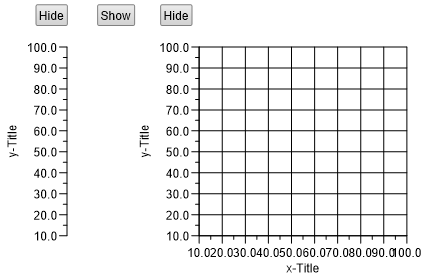
Source code:
// button_layer_show?Diagram1
def button_layer_show()
{
    hTB = _g()._handle();
    hPage = AppGetActivePage()

    ssFuncName = ObjectGetCallbackFunctionName(hTB, "ObjectClickCallback");
    sv = strtok(ssFuncName, "?")

    hLayer = PageGetLayerHandle(hPage, sv[2])
    nFlags = OBJGetProtect(hLayer)
    if (nFlags & BL_HIDE) {
        OBJSetProtect(hLayer, nFlags & ~BL_HIDE)
        TBSetText(hTB, "Hide")
    } else {
        OBJSetProtect(hLayer, nFlags | BL_HIDE)
        TBSetText(hTB, "Show")
    }
    PageReplot(hPage);
    return TRUE;
}
See also
Edit Object=>Text, Edit Object=>Pattern, Edit Object=>Color Gradient, Edit Object=>Position and Size, OBJSetProtect
id-665238