Diagram=>Link Axes Scales
The command will link the axes scales in the document.
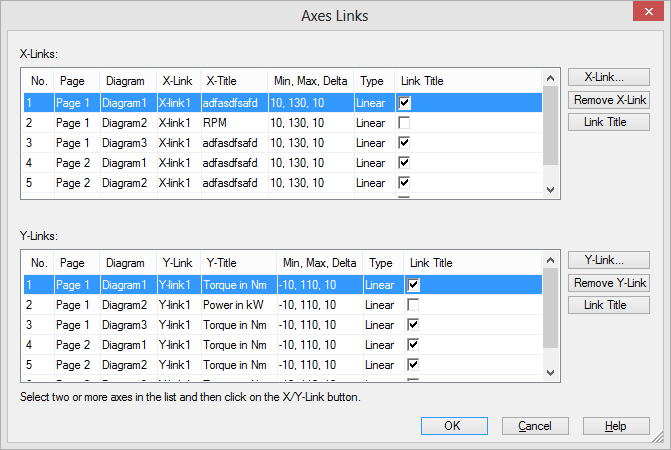
This command can be accessed by a “right mouse click menu” (context menu) on a diagram.
The top list displays the X-axes scales in the document.
The bottom list displays the Y-axes scales in the document.
To select a range of axes hold down the Shift key. To add or remove axes to the selection hold down the Ctrl key.
All axes with the same link name will display the same axis scale. If the scaling of a linked axis scale is modified all linked axes will be updated when the page is activated.
If the Link-Title check box is selected (default), all linked axes will display the same axis title.
To create a link between axes do the following:
Right click in a diagram and select Link Axes Scales
To create a link, select the scales in one of the lists and click on the X-Link or Y-Link button. Select a link name or create a new link name. To remove a link choose the link name
-- No Link --.
The scaling and axis title of all linked axes will be updated automatically if the scaling of an axis is modified.
Only axes which are not linked to other axes in the Diagram=>Diagram Settings dialog box can be linked via a name. In opposite to the linked axes set in Diagram=>Diagram Settings a link using a name can link axes on different pages of a document.
If you copy a diagram with link the link name will be copied as well.
With named links, stacked diagrams can be linked. This is not possible with the axis link, specified in Diagram=>Diagram Settings. .. us.history
History
Version |
Description |
|---|---|
R2024.3 |
New axis link automatic naming increased up to 99 links. |
R2012.12 |
New option to link axes titles. |
R2011.12 |
Axis title not part of a link. Every axis can have a different title. |
See also
id-1852690