Browser=>Interpolation
This command creates a new NC file which contains one time channel. Data channels are interpolated for the selected time channel. The function cannot perform an extrapolation.
Example: A test contains data channels logged with 10 Hz and 100 Hz. Now you would like to execute some computations between channels of different time groups. In this case you can use this function to interpolate all data channel to a time channel with 100 Hz.
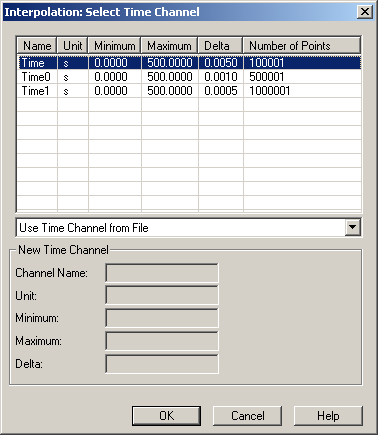
If the functions could be executed the result file will be displayed in the
browser. The new file name is the name of the original file followed by the
string _trans.
To execute the function open the data browser (File=>Import Data) and right click in the data grid. From the shortcut menu choose More Functions.
- Time Channel List
The list displays all channels that possess the channel attribute
Type="Time Channel". For MDF and IFILE files the attribute is created during the import. To create the attribute manually right click a time channel and choose Add Attribute from the shortcut menu.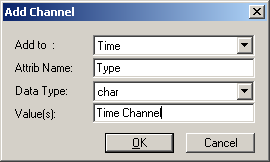
- Use Time Channel from File
- Specifies whether a new time channel is created or a time channel from the list is used.
- Channel Name
- Name of the new time channel.
- Unit
- Unit of the new time channel.
- Minimum
- Minimum value of the time channel. The value should be in the measured time range. Values outside this range will be set to missing.
- Maximum
- Maximum value of the time channel. The value should be in the measured time range. Values outside this range will be set to missing.
- Delta
- Distance between two consecutive data points.
Comment
For MDF files (VS100/Inca) the channel name prefix Gxx_ is removed.
Import of MDF Files.
The Browser=>Interpolation function is written in UniScript. The source code
is found in the file mn_grid.ic.
String Channels
String channels can be interpolated and UniPlot uses the following rule: the interpolated channel take the original channel value until the interpolated time channel is equal or above to an existing time point in the original time channel.
Example:
- Original file at 1Hz
Time   String Channel
0      A
1      B
2      C

- Interpolated file at 2Hz
Time  String Channel
0     A
0.5   A
1     B
1.5   B
2     C
History
| Version | Description |
|---|---|
| R2022.4 | String channels are interpolated. |
| R2022.4 | _nc_enum information is kept during interpolation. |
See also
id-62907