Import of MDF Files
The Addin converts MDF data files to UniPlot-netCDF data files.
The calibration systems VS100/INCA (ETAS GmbH) or the Drive-Recorder from IAV GmbH and the CANalyzer (Vector Informatik GmbH) create MDF files.
Installation
- Choose Tools=>Add-In Manager.
- Check the “MDF-Import” addin.
- Choose OK. Restart UniPlot.
Usage
- Start UniPlot.
- Choose File=>Import Data.
- Choose Type
"MDF File (*.dat; *.mdf)". - Select one or more MDF files.
- To create a dataset versus time: Choose the Type
2D: y/t MDF/INCA/CAN. If you select this type UniPlot will automatically select the correct time channel.
Configuration
Use the Tools=>Configuration MDF (INCA) to set the option for creating the channel names in the NC file.
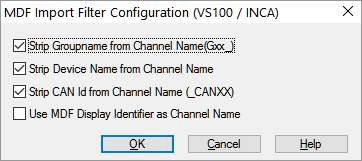
Options:
- Strip Group Name from Channel Name (Gxx_)
- If this option is marked, the group name is not added to the channel name. If the MDF file contains multiple time groups the time channel names are enumerated as following: time, time_2, time_3, etc.
- Strip Device Name from Channel Name
- If this option is marked, the characters following the first backslash are removed from the channel name.
- Strip CAN Id from Channel Name (_CANXX)
- If this option is not marked, the characters _CANXX where XX is the message id is added to the channel name. The text is only added if the channel is a CAN bus channel.
- Use MDF Display Identifier as Channel Name
- If this option is marked, the display names are used as channel names instead of the long names.
If MDF file are imported in your own scripts the settings can be set in your script as following:
WriteProfileInt("Settings", "MDF_StripDeviceName", 1);
WriteProfileInt("Settings", "MDF_StripGroupName",1);
WriteProfileInt("Settings", "MDF_UseDisplayNames", 0);
WriteProfileInt("Settings", "MDF_StripCANID", 1);
Attribute mdfComment
The mdfComment attribute can have multiple lines.
If a line of the mdfComment contains a colon (:) the line will be split
into a attribute name and value. The line will be removed from the mdfComment
attribute.
Example:
City Testdrive
Engine: x1234
Temperature: 22 °C
In the nc file the following attributes will be created: Engine=``x1234``, Temperature=``22 °C``, mdfComment=``City Testdrive``.
Format
In MDF format, data is saved in groups. Each group contains signals with the same
time base. For each group one time channel is saved in the netCDF file. The group
number with the letter G is added to each channel name, e.g. G1_ZWSTAT.
The data is saved as a float (4 bytes) in the specified units.
Trigger information is saved for each time channel (if triggers were used). In
this case the following attributes are saved: tr_trig_time, tr_trig_pre,
tr_trig_post, tr_condition and tr_wincount.
The attribute tr_wincount contains the number of trigger times saved in
tr_trig_time, tr_trig_pre, tr_trig_post.
It is not necessary to select the correct time channel in the Import dialog box.
Example: X: G2_Time, Y: G2_vfzg). You can simply choose G1_Time
and then select any signal, e.g. X: G1_Time, Y: G2_vfzg. UniPlot will
choose the correct time channel.
Signals from different groups can be correlated. The function will use linear
interpolation to make sure both signals use the same time, e.g.
X: G1_Lst, Y: G2_vfzg).
The following parameters are read from the Windows-Registry:
| Key | Type | Default Value | Description |
|---|---|---|---|
| Settings\MDF_StripDeviceName | Number | 0 | Flag for MDF import. For example INCA/VS100. If the flag has the value 1, the channel name in MDF files is cut at the first backslash. Normally the channel and device name are separated by a backslash. Default Value is 0. Example: G3_InjCrv_phiMI1Des_ETKC_1 (Name with device name ETKC), G3_InjCrv_phiMI1Des (Name without the device name). |
| Settings\MDF_StripGroupName | Number | 0 | Flag for MDF import. For example INCA/VS100. If the flag has the value 1,
the channel name in MDF files does not contain the groupname, e.g. G1_.
Default Value is 0. Example: G3_InjCrv_phiMI1Des_ETKC_1 (Name with group
number), InjCrv_phiMI1Des (Name without group number). |
| Settings\MDF_StripCANID | Number | 1 | If this option is not set, the characters _CANXX where XX is the
message id is added to the channel name. The text is only added if the
channel is a CAN bus channel. |
| Settings\MDF_UseDisplayNames | Number | 0 | If set to 1, the display name is used as the channel name. |
The options can be set with WriteProfileInt:
WriteProfileInt("Settings", "MDF_StripGroupName",1);
WriteProfileInt("Settings", "MDF_StripDeviceName", 1)
WriteProfileInt("Settings", "MDF_UseDisplayNames", 0);
WriteProfileInt("Settings", "MDF_StripCANID", 1);
See also UniPlot’s Use of the Windows Registry.
The channel attribute C_format can be used to format the channel data. For
example, to display the data as hex values type in the format string 0x%08x.
(Import MDF file, click on the >> button. Select the channel and click on the
C_format attribute. Type in the format string 0x%08x and click on the
Set button.)
Norm-Names
The addin Norm-Names can be used to replace channel names with
norm names. For example the name Engine_01_BZ_Speed_CAN1 could be replaced
with speed.
Default scheme name is MDF. A column with this name must be added to the norm
name Excel file. Insert the scheme name in Row 1.
Alternatively you can use a global attribute value from the MDF file as a scheme
name. For example Project=x123`. In this case you must insert the attribute
name ``Project into the windows registry with the following command:
WriteProfileString("NormName", "mdf_scheme_name", "Project");
For this example add the scheme name x123 to the Excel file.
History
| Version | Description |
|---|---|
| R2015.10 | New Option Settings\MDF_StripCANID. New Version 3.7.3. |
| R2013.8 | New attributes MDF-Format and MDF-Program.
For MDF files created with DIAGRA M (RA Consulting GmbH,
http://www.rac.de) the unit string for time channels are set to s.
New Version 3.7.2. |
| R2013.6 | If the time channel values are not strictly increasing a small number (1e-12) is added to che consecutive identical time values to make sure is is strictly increasing. |
| R2013.1 | Norm Name Conversion added. |
| R2012.4 | Un unsorted MDF file will be sorted. The sorted file will be saved in
the directory of the nc2 file. The text _sorted will be added to the
file name. |
| 5.11.2 | Empty channel attribute C_format added. |
| 4.2.5 | MDF Display Identifiers can be used as channel names. |
id-1494772