How do I open and analyze MDF4 files?
UniPlot reads ASAM MDF 4 files (.mf4) with the MDF4 import add-in. During
the import the file is converted into UniPlot’s NC2 format. After that the
channels are available like those of any other data file: plot them by drag
and drop, apply filters, compare runs and put them into reports. Older MDF
files up to version 3.3, for example from INCA, are read as well.
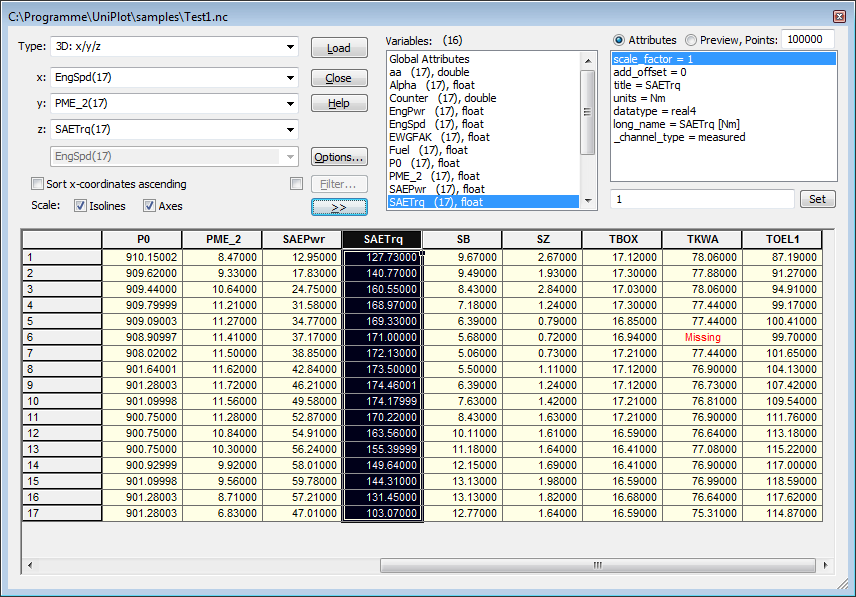
After the import, UniPlot lists the channels of the converted file with their attributes and values.
How it works
Choose Tools=>Add-In Manager, check the MDF4 Import add-in, click OK and restart UniPlot. This is only needed once.
Choose File=>Import Data and set the file type to
MDF4 File (*.mf4).Select one or more MDF4 files. UniPlot converts them to NC2 files.
Drag the channels you need into a diagram.
If the MDF4 file contains CAN bus logging data, also load the CAN Import add-in and select the DBC files under Tools=>CAN Configuration (DBC file) (see How do I decode a CAN log file (BLF or ASC) with a DBC file?). UniPlot then decodes the CAN frames into physical signals during the import.
In a script, the same import is one call:
ssNC = auto_ImportData("d:/test/run_042.mf4");
Why it helps
MDF4 data gets all of UniPlot’s tools: filter functions, peak and limit checks, report templates and batch processing.
Several files can be imported in one step, for example all runs of a test day.
Measurement data and CAN bus data from the same file end up in one data file.
Good to know
Bus logging: only CAN frames with up to 8 bytes payload are decoded, other bus systems are ignored. For files with bus data, delayed loading is switched off and all data is loaded at once.
The manual still marks the MDF4 add-in as a beta version.
For MDF files up to version 3.3 load the add-in MDF Import (e.g. VS100/INCA) and choose the file type
MDF File (*.dat; *.mdf). Tools=>MDF Configuration (INCA) controls how channel names are built (group name, device name, CAN Id).For your own scripts there is a reading API (
mdf4_open,mdf4_open_groups,mdf4_channel_get_dataand more), see How do I write an MDF4 file from a script?.