Diagram=>3D View
Specifies the point of view and projection of the 3D Surface Plot.
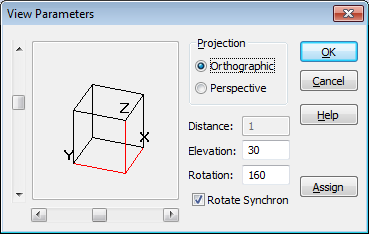
Point of view is defined using the Elevation and Rotation parameters.
- Projection
You have the choice between a parallel or a perspective projection.
- Distance
If you have chosen a perspective projection, you can decide on the distance of the point of view to the diagram. The distance in a parallel projection is infinite.
- Elevation
This parameter determines plot elevation. Elevation settings must lie between 0 and 90 degrees. At 0 degrees, you look at the plot directly from its side, and at 90 degrees from above. The elevation angle can also be set with the vertical scroll bar.
- Rotation
This function rotates the angle of the point of view around the z-axis. The angle can be set between 0 and 360 degrees. Rotation is also possible using the horizontal scroll bar.
See also
id-1187648