Norm-Names
The Addin RS_NORM is an extension for UniPlot to replace attribute and channel names with norm names.
The following import filters use the norm name addin:
| Typ | Standard scheme name |
|---|---|
| UTX | Value of attribute “scheme”, for example scheme=TestCell1 |
| ASAM ODS 3 | “PumaOpen” |
Instead of the scheme attribute another global attribute can be selected that
contains the scheme-name. Example: Testcell=B20. This means the original data
contains a global attribute Testcell. The attribute contains the value
B20. The Norm-Name-Table should contain a column with the name B20. The
channels of this column will be replaced by norm names. Channel names not found
in the column will not be replaced. If the scheme is not found in the
Norm-Name-Table, the original channel names are not altered.
The following calls will set the attribute names for the scheme name:
UTX-Files:
WriteProfileString("NormName", "utx_scheme_name", "Testcell");
ASAM-ODS-3 Data:
WriteProfileString("NormName", "aods3_scheme_name", "Testcell");
For ASAM-ODS-3 data a different scheme values can be set:
WriteProfileString("AODS_BROWSER_3", "NormNameScheme", "MyPumaOpen");
Copy the commands into the UniPlot command window. The values will be saved in the Windows registry.
Installation
Open the Addin Manager (Tools=>Add-In Manager) and mark the Addin
Norm Names.
Norm-Name Table
You need Excel to create the norm name file. Example file in the
uniplot\addin\rs_norm directory. The file name is
norm_example.xls.
The Excel file has two sheets with the names Headernames and Channelnames.
Cell A1 must be XLS-NormHeaderNames:v1 or XLS-NormChannelNames:v1.
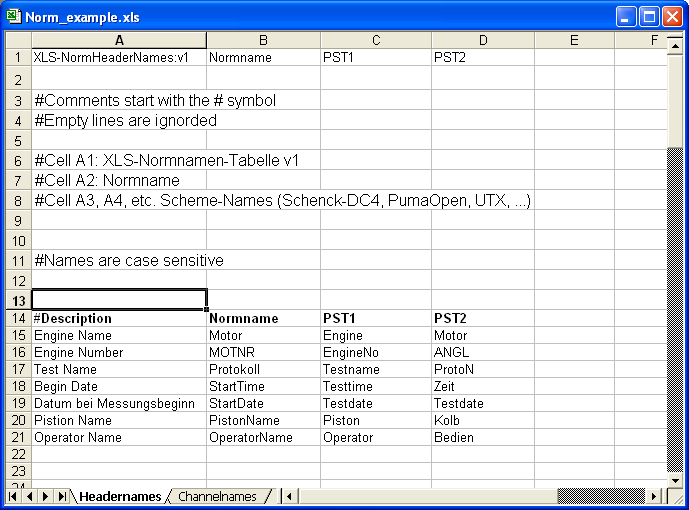
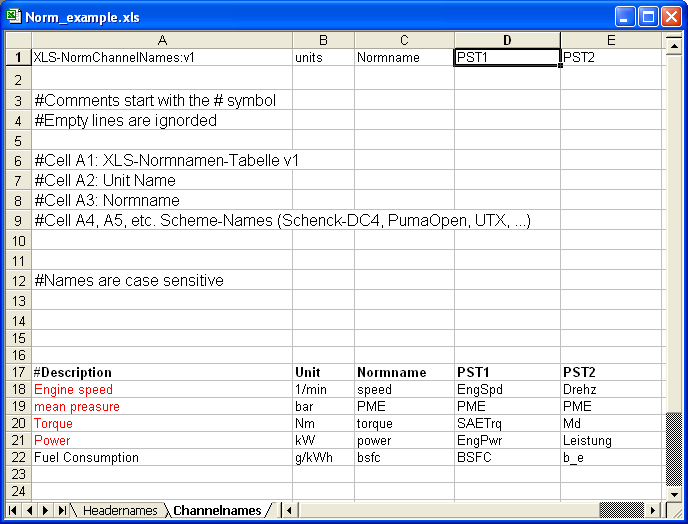
Norm names must begin with an alphabetic character or an underscore, followed by zero or more alphanumeric characters including the underscore (_) or numbers. Case is significant.
The header and channel names for the schemes must be identical with the names in the source format. Case is significant.
Configuration
In this dialog box the norm name translation can be enabled.
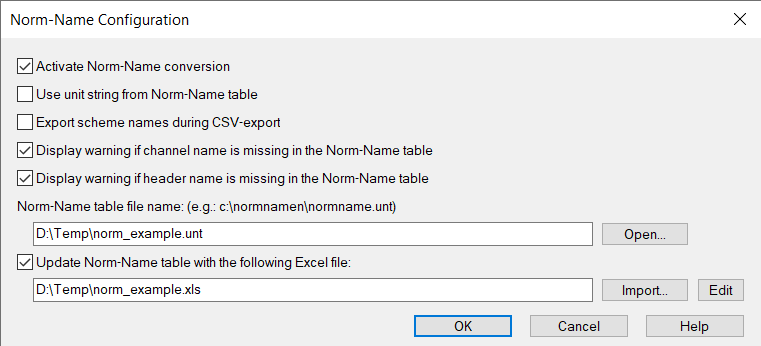
Export scheme names during CSV-export: The CSV export has an additional (second) line containing the scheme name. The setting can also be set using the following UniScript command:
WriteProfileString("NormName", "ExportSchemeName", "1");
Example CSV export:
Channel1-NormName, Channel2-NormName, Channel3-NormName
Channel1-SchemaName, Channel2-SchemaName, Channel3-SchemaName
Channel1-Unit, Channel2-Unit, Channel3-Unit
1, 0, 1.1
2, 0, 1.2
The Excel file with the norm names can be imported using the Import…
button. If the norm name file with the extension .unt is missing the
function will create a new .unt file in the same directory as the Excel
file.
Update norm name table with the following Excel file: The .unt file
will be updated whenever the Excel file changes.
UniScript
Example: How to apply the norm names to an existing NC file. Call this example function after you have create the NC file:
def NC_ApplyNormNames1(ssNCFile)
{
    ssScheme = "PumaOpen";   // must be scheme in the norm name file.
    ncid = nc_open(ssNCFile, NC_WRITE);
    if (ncid == -1) {
        return FALSE;
    }
    nc_redef(ncid);
    NC_ApplyNormNames(ncid, ssScheme)
    nc_endef(ncid);
    nc_close(ncid);
    return TRUE
}
The following example uses the callback function OnImportUpdateNCFile to
apply the norm names OnImportUpdateNCFile is invoked when an NC file is
opened, for example with auto_ImportData.
def OnImportUpdateNCFile(ssNetCDFName)
{
    global _hNN;

    if (NN_IsActive() == FALSE) {
        return TRUE;
    }
    if (_hNN == 0) {
        return TRUE;
    }

    svData = MapLookup(_hNN, "$AvailableScheme");
    ssInit = CreateListBoxText(svData);
    ssScheme = DialogBox("|C10                                         ", ssInit, "Select a norm name scheme");
    if (ssScheme == "DLG_CANCEL") {
        return TRUE;
    }

    ncid = nc_open(ssNetCDFName, NC_WRITE);
    if (ncid == -1) {
        MessageBoxError("Cannot open NC file: %s", ssNetCDFName);
        return TRUE
    }
    nc_redef(ncid);
    NC_ApplyNormNames(ncid, ssScheme);
    nc_endef(ncid);
    nc_close(ncid);
    return TRUE;
}
History
| Version | Description |
|---|---|
| R2018.10 | Excel 2007 Files (XLSX) can be used. |