Edit=>Object Properties=>Picture
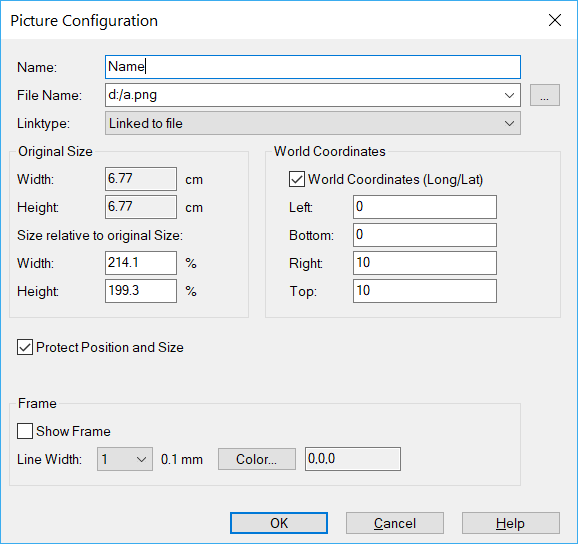
The picture properties can be edited in this dialog box.
Filename
File name of the picture.
The following picture formats are supported:
Type |
Meaning |
|---|---|
GIF |
Graphics Interchange Format. |
PNG |
Portable Network Graphics. |
JPG |
JPEG File Interchange-Format |
BMP, BMZ |
Bitmap and Bitmap compressed. |
WMF, WMZ |
Windows Meta File and Windows Meta File compressed. |
EMF, EMZ |
Enhanced Meta File and Enhanced Meta File compressed. |
Linktype
Pictures can be embedded into the IPW document or linked to picture files.
The following link types are available:
Type |
Meaning |
|---|---|
Embedded |
The picture is saved in the IPW file. |
Linked to file |
Only the link is saved in the IPW file. |
Embedded with link to file |
The picture is saved in the IPW file. If the linked file is available the picture will be updated during loading. |
If the picture is linked, UniPlot uses the following search strategy to find the source file of the picture:
Look for the picture in the directory given by its file name.
Look for the picture in the directory of IPW file.
Look for the picture in the directory specified in the dialog Tools=>More Options.
You can insert pictures as OLE objects into an IPW document with all UniPlot versions. These pictures are saved in the IPW document as uncompressed bitmaps. If the IPW file contains multiple OLE objects the file can grow very large.
- Width, Height
Picture width and height can be specified in percent to its original size.
- Show Frame
Draws a frame line around the picture.
- Line Width
Line width or the frame line in steps of 0.1 mm.
- Color
Frame line color.
Comment
If the picture file cannot be found in the specified directory
or the name is specified without the path or a relative path is
specified (e.g. ..\picture\test.jpg), UniPlot
searches for the picture in the following order:
In the directory where the IPW file is saved.
In all directories specified in the dialog box Tools=>More Options.
To send an IPW file with linked pictures to another UniPlot user, send the picture files as well. Save the picture files in the same directory as the IPW file.
Linked pictures are reloaded when the OK button is pressed.
id-946110