Dialog Box=>Line Style
Sets the attributes of the plotted lines.
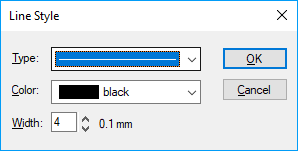
- Type
Line type can be set in this box. The following styles are available:
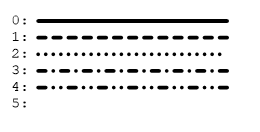
Non-solid line types can only be used when their width is set to 0.1 mm.
- Color
- A choice of 16 colors is available. Colors will be plotted in gray shades on a black and white printer.
- Width
- The width of lines can be changed from 0.1 mm to 10 mm in 0.1 mm steps. Depending on the resolution of your monitor, each 0.1 mm step will not be properly plotted on the screen. Each step will appear on a high resolution screen.
id-479890