Diagram=>Layout=>Ticks
In this dialog box, the length, width and position of the axis tick marks can be set.
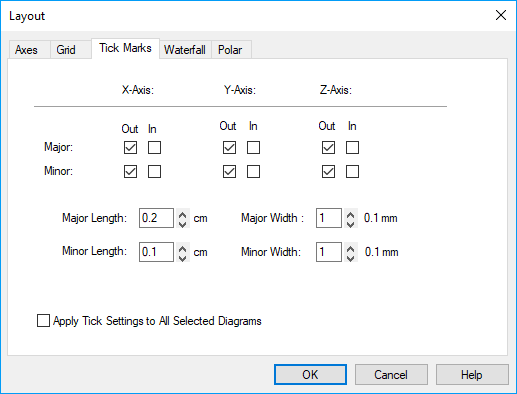
- Major Ticks
- Those ticks on the axis that are labeled with number values will be drawn as major ticks. The number of ticks can be set with the Minimum, Maximum and Delta parameters in the Diagram=>X/Y/Z-Axis=>Parameters dialog box. The check boxes specify if the major ticks should be shown inside or outside the diagram.
- Minor Ticks
- Minor tick lie between major ticks. The number of minor ticks lying between the major ticks can also be set in the Diagram=>X/Y/Z-Axis=>Parameters dialog box.
- Length
- Sets the tick length in centimeters.
- Width
- Sets the tick width in 0.1 mm.
- Apply Tick Settings to All Selected Diagrams
- If this box is checked, the tick settings will be applied to all selected diagrams in the page.
Comment
The tick marks will be plotted in the same color as the axis.
See also
Diagram, Diagram=>Layout=>Axes, Diagram=>Layout=>Grid, Dialog Box=>Line Style, Diagram=>X/Y/Z-Axis=>Parameters
id-1129971