Data=>Data Cursor
The data cursor will display the values at the cursor position of the selected dataset in a tool tip and in a dialog box.
To display a data cursor, select a dataset and press F5 or
choose Data=>Data Cursor. To disable the cursor press F5 again.
You can move the cursor with the arrow keys or the mouse. While holding down the Ctrl key cursor 1 is moved otherwise cursor 2. Cursor 1 can be anchored at one position. The position will not be updated automatically, if the cursor runs out of the x-axis range.
The cursor can display interpolated values or only values for existing data points.
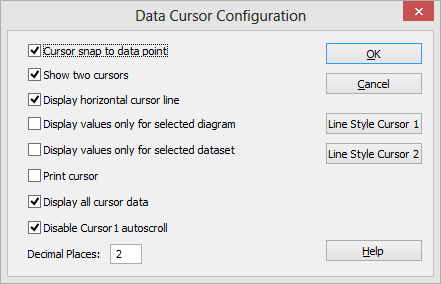
If 2 cursors are displayed values between the cursor positions can be calculated To enable the extra values open the configuration dialog box.
To open the cursor configuration window, double-click on one of the vertical cursor lines Data=>Data Cursor Configuration.
The cursor window displays the dataset values at the cursor position. Each element is displayed in the color of the dataset curve.
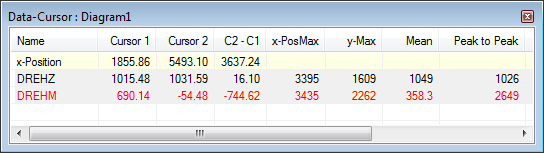
To copy the contents of the cursor window into the clipboard, right click in the window and select the copy command.
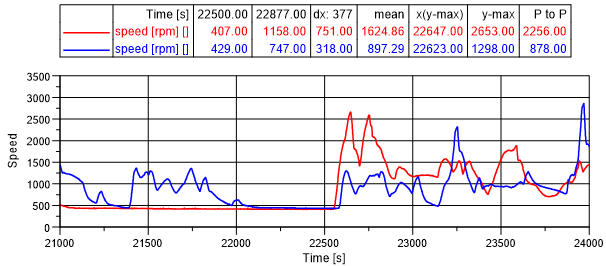
A table can be added with the cursor data to the IPW page with the command Data=>Cursor Data Table:
id-1935278