What’s New in UniPlot 5.14
This page describes the changes made to UniPlot 5.14 since version 5.13.
What’s New in UniPlot 5.14.9
Enhancements
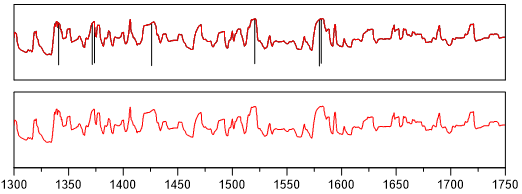
Median filter function to remove spikes and other noise. For formulas (see smooth_median(c, nNeighbor)) and datasets (smooth_median - Smooth (moving median)).
New text field function: @f{ncvaluefromdata} to display single channel values from a netCDF file as text, @f{datasetfilter} to display the record filter of a dataset.
New UniScript Functions
New Functions in UniPlot 5.14.9 |
|
|---|---|
Displayes the record filter for the given dataset. |
|
The moving_median function calculates a moving median. The function operates over a moving window of values. For each window, the middle value found in the window is used. |
Modified UniScript Functions
The changes are listed in the history table at the end of the function description.
Modified Functions in UniPlot 5.14.9 |
|
|---|---|
PageGetAllDatasets returns a vector with the handles of all datasets of the given page. |
Bug Fixes
The following bugs have been fixed:
(ID2587): DocPrintPDF: If the function was invoked without having used the dialog command PDF Export at least ones the function would fail with the error message (Ghostscript not found).
(ID2588): DialogBox: The string length in combo boxes was limited to 255 characters. If the string was longer than 255 characters a memory-access violation occurred. The limit has been raised to 1024 characters. Longer strings will be cut off at the new limit.
(ID2595, ID2596): The option “Allow special characters in channel names” (see Tools=>More Options and nc_set_option) was activated after a restart of UniPlot. The default value was set to enabled instead of disabled as described in the documentation.
(ID2597): 1D-Datasets: A 1D-Dataset could only be created from a channel with at least 2 data points. This value has been set to 1. Now a 1D dataset can be created from a data channel with 1 data point.
(ID2600): File legend: If the header row was enabled and than disabled the first row of the legend was not updated correctly.
(ID2601): DocPrint: Field functions and global place holders were not updated on unloaded pages.
What’s New in UniPlot 5.14.8
Enhancements
The UniPlot setup program does not write to the windows registry. The settings for the current user are written to the registry when UniPlot is started.
UniPlot can be installed simply by copying the install directory (XCOPY Deployment). It can be copied onto a USB stick or SD card. If UniPlot is located on a network drive it can be executed on the local machine without any installation. Please note: For each computer in the network, a separate UniPlot license is required.
Table Configuration dialog box (Edit Object=>Table Configuration) New Option: Reference Position. Sets the anchor point which specifies in what direction the table size will grow, if a column or row is resized.
Copy (Ctrl+C): The copy function for table objects has been modified. The copy function copies the cell text and the cell name to the clipboard. The paste function (Ctrl+V) inserts the name into the cell name. If no cell of a table object is selected the complete object will be copied to the clipboard.
Create legend for datasets (table) see Table=>Dataset Legend Configuration.
Event Window: If the “Source” column contains a file name it can be opened by a double click on file name (see View=>Event Window).
Bug Fixes
The following bugs have been fixed:
(ID2517): Cursor Table: A double-click on the cursor table opens the configuration dialog box. (see Data=>Cursor Data Table).
(ID2543): File=>More File Functions=>Synchronize Data Files: The calculated time offset was not assigned to the files.
(ID2544): The font size of table object could not set to a font size not specified in the font size toolbar button.
(ID2552): Data=>Data Exchange (Page): The Action string was sometimes not used correctly.
(ID2553): UniScript error messages were displayed in English even when the dialog language German was selected.
(ID2559): TableSetName could not be invoked with the parameter rvSel.
(ID2561): GetUserDirectory could fail if the computer was not configured correctly.
(ID2571): Data Browser: If the browser displayed the units in the data grid the last record could not be removed with the command Ctrl+Del. The first rows could not be deleted if the unit row was selected as well.
(ID2572): 2D-Hatch: The output of the hatch filling has been modified, so that the solid fill of dataset 2 will be plotted over the hatch of dataset 1.
(ID2574): File=>Export Data: xlsx-Export: The length of a sheet name in xlsx files is limited to 32 characters. Excel-2007 cannot read files with longer sheet names without displaying an error message. Sheet names will now be clipped after 32 characters.
(ID2580): The obj_keys function returned an incorrect result if invoked with 2 parameters.
o = [. 1 = 1, 10 = 10]
obj_keys(o, 5) => 1, 10 // incorrect
o.keys(5) => 10 // ok
(ID2582): If GetTempPath returned a directory without write access, latex formulas could not be created (see Edit=>Insert LaTeX Formula) Please check ith the Window environment variables
TMPandTEMPare correct.(ID2583): LaTeX: The
latex-pathwas not evaluated correctly. (see Edit=>Insert LaTeX Formula).
What’s New in UniPlot 5.14.7
Enhancements
The function that IPW files are automatically saved compact File=>Close (Save Compact) can now be disabled. See Tools=>More Options Page “Path and Files” - Option: “Save document compact”.
The option that special characters are allowed in channel names can now be disabled. See Tools=>More Options, Page “Data-Import and Data browser”. The option was introduced in UniPlot 5.14.5.
If the help files of a network installation are installed on the local drive, they will be updated automatically if the network installation is updated.
New UniScript Functions
New Functions in UniPlot 5.14.7 |
|
|---|---|
nc_from_obj creates a netCDF file from a special structured UniScript object. |
|
nc_to_obj reads a netCDF file or a selection of channels of a netCDF file into a UniScript object. |
Modified UniScript Functions
The changes are listed in the history table at the end of the function description.
Modified Functions in UniPlot 5.14.7 |
|
|---|---|
AppGetGlobalOption returns a value of an option from Tools=>More Options. |
|
AppSetBatchMode sets the batch mode flag. If batch mode is enabled the display of dialog and message boxes are suppressed. |
|
AppSetGlobalOption sets a value of an option from Tools=>More Options. |
|
NC_ExportData converts UniPlot data files (.nc, .nc2) into another data format. |
|
obj_lookup returns the value of a given key. |
Bug Fixes
The following bugs have been fixed:
(ID2488): The DocExchangeDataFiles function did not evaluate the “UNCHANGED” flag correctly.
(ID2489): mdf/vs100-CANALYZER files are using the so called
COMPU_VTAB_RANGEtable to save the data scaling.Example:
0.000000           0.000000  {LINEAR_CONV "0.000274667*{X}-0.63"}
-32768.000000 -32768.000000  OUT_OF_RANGE
The table will now be evaluated.
(ID2495): Data=>Data Exchange (Page): The element Record filter in the option dialog box of the data exchange was not initialized correctly.
(ID2508): Remove records in the Data Browser: The bug fix in UniPlot 5.14.6 did not work. (Error ID2486).
(ID2513): Table Object: A selected field function was not inserted into the active cell.
(ID2515): Field Function
Legend Table: The comment column could not be disabled.(ID2519): Isoline labels could not be inserted using the mouse (since UniPlot 5.14.5).
(ID2527): Formula Interpreter: Channel names containing special characters could not be used in formulas. Since UniPlot 5.14.5 channels can contain special characters which must be replaces by underscores in formulas.
(ID2535): File=>More File Functions=>Synchronize Data Files: The option
Merge Files into one Filefailed with an incorrect error message.
What’s New in UniPlot 5.14.6
Enhancements
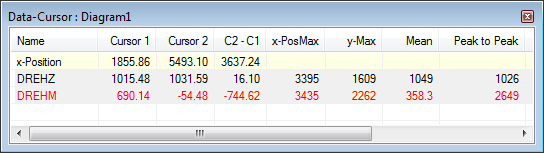
The curve color is used to display the data in the cursor window (see also Data=>Data Cursor):
Bug Fixes
The following bugs have been fixed:
(ID2013): Sometimes, the window menu did not display the correct number of open documents.
(ID2461): ASAM-ODS Browser (RPC): Sometimes a memory access violation occurred in the Browser window.
(ID2481): Export of netCDF data files as Excel 2007 files (xlsx): If an attribute in the netCDF file contained invalid characters (code 0x11 to 0x1F) the file could not be opened with Excel. The invalid characters will not be written to the Excel file.
(ID2485): In some rare cases a reading error of Properties of UniPlot data files (nc2) could occur (netCDF-up and netCDF-up (compressed)). The error occurred if: 1.) If the channel length in Bytes/4000 contained a remainder greater than 3880. 2.) The compression result was greater than 4000 Bytes. That means the data compression was poor.
(ID2486): The function to delete records in the data browser was incorrect. The line before the selected row was deleted. The error occurred only in version 5.14.5. The error occurred in the following UniScript functions as well: GridGetLeftCol, GridSetLeftCol, GridGetTopRow, GridSetTopRow, GridGetSelection, GridSetSelection, GridGetSelectedRows, GridGetSelectedCols, GridSetValues.
What’s New in UniPlot 5.14.5
Enhancements
The data editor displays the unit string in the row below the channel names:
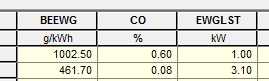
The unit string can be disabled with the command:
WriteProfileString("GRID_OPTIONS", "ExtraTitle", "_none_");
The following command displays the data for the “units” channel attribute:
WriteProfileString("GRID_OPTIONS", "ExtraTitle", "units");
or a different channel attribute, e.g. “title”.
The File=>Close (Save Compact) command will be invoked automatically. Backup files are only created optionally.
Maps can be displayed with log scaled axes.
The following 10 special characters are allowed in channel names:
.,-,+,$,#,~,!,^,&,%.The handling of special characters can be disabled with the following command:
WriteProfileInt(“Settings”, “nc-allow-special-chars”, FALSE);
If the handling is disabled, UniPlot will replace the special characters by underscores (compatible to older UniPlot versions). See also nc_set_option.
Data=>Data Exchange (Page): The start directory for the file open dialog can be set in the option dialog box.
Data=>Cross-section (3D): New Option added: “Clip curves at the dataset hull”.
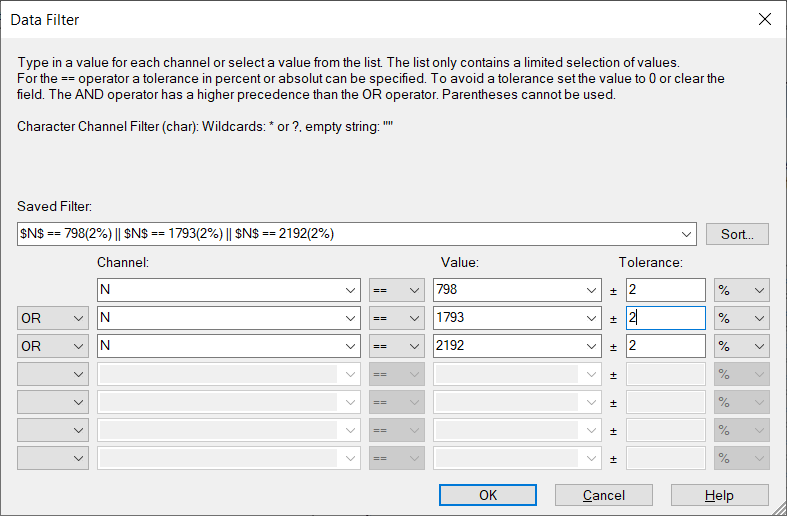
Dialog Box=>Data Filter: The record filter for NC files has been extended. A tolerance can now be specified for the == operator:
Data=>Data Exchange (Page): The cross section curves will now be updated during data exchange.
New UniScript Functions
New Functions in UniPlot 5.14.5 |
|
|---|---|
IpwInfo returns the number of streams and the total size of all streams of an IPW or IPZ file. |
|
us_lock locks the Windows message loop while an UniScript function is executed. |
Modified UniScript Functions
The changes are listed in the history table at the end of the function description.
Modified Functions in UniPlot 5.14.5 |
|
|---|---|
nc_get_option gets an option. |
|
nc_makevalidname returns a valid netCDF variable name for a given name. |
|
nc_set_option sets an option. |
|
nc_varid returns the ID of a netCDF variable when given its name. |
|
The nc_varinq_name function returns the name of a netCDF variable when given its ID. |
Bug Fixes
The following bugs have been fixed:
(ID2435): If an addin was not available it was disabled. Now the addin settings are not modified if an addin cannot be loaded.
(ID2436): The fill mode for netCDF-up-files was ignored from UniPlot 5.10. (see nc_setfill).
(ID2437): The delayed loading of netcdf files (available for MDF and TDM files) could crash UniPlot.* (ID2438): Data=>Data Exchange (Page): The interpolation on grid lines was not updated correctly. The XYZSetData function did not execute a new interpolation if the option “Interpolation on grid lines” was set.
(ID2439): Data=>Data Exchange (Page): The 3d Style attributes could not be set in the dialog box.
(ID2442): The MATLAB import filter (see Import of MATLAB Data Files) contained three elements which could not created with MATLAB:
_channel_info,_globalsand_. The elements have been renamed tochannel_info,globalsandorder.(ID2443): File=>Export Data: The channel selection dialog box was displayed for export formats which do not support the channel selection, for example the TDM format.
(ID2455): Data=>Difference map and other functions (3D): The first selected dataset could not be changed in the dialog box.
(ID2460): File=>Export Data: The function had a bug that occurred only in UniPlot 5.14.4. The error message “invalid number of arguments” was displayed.
(ID2463): The data balloon tooltip was clipped at the monitor edge. Now the tooltip will be moved automatically.
(ID2467): MDF/Inca-Import: Only files with less than 256 time groups could be loaded.
What’s New in UniPlot 5.14.4
Enhancements
New Data Browser command: Remove all “Missing Value” Channels. Channels containing only missing values are removed from the NC file. To execute the new command open the data browser and right click in the data grid.
ASAM-ODS Browser (RPC): New option Ignore missing value channels. If the option is enabled, channels containing only missing values are not written to the NC file.
File=>Export Data: The channels can be selected from a list of channels.
Bug Fixes
The following bugs have been fixed:
(ID2351): The channel list box in the NC_Edit dialog box could not be used if UniPlot was started as an Icon.
(ID2353): The nc_dimredim and fsetlen function had an error if a data stream was shortened.
(ID2354): matlab_load: Files containing structures with int8 coded strings could not be loaded.
(ID2365): The performance of the histogram-function has been improved by using the histc function.
(ID2386): MATLAB files: UniPlot crashed if a channel name had more than 255 characters. This limit has been extended to 1024 characters. If a name is longer than the new limit, an error message is created. (matlab_load).
(ID2403): 1D-Dataset: In rare cases the y axis was scaled as a time/date axis during import.
(ID2404): Histogram filter function: If the filter was specified with the number of bins, one bin less than specified was created. Example: The filter
histogram(1, 0, 0, 5)would only create 4 instead of 5 bins.(ID2405): If the auto scale option for axes was enabled, the axes were not updated if a dataset filter function was modified or the filter was enabled or disabled.
What’s New in UniPlot 5.14.3
Bug Fixes
The following bugs have been fixed:
(ID2347): The “Save As” command removed pages of the original IPW file in the following instance: An .ipw file was created, for example, with two pages. The file was saved as A.ipw. The second page was then removed and the file saved as B.ipw. The document was closed. The result was that the second page was then missing in both documents. This bug in in all versions since UniPlot 5.10.
What’s New in UniPlot 5.14.2
Bug Fixes
The following bugs have been fixed:
(ID2316): The histc function returned a histogram with one bin more than specified.
(ID2325): PDF-Export: Maps with color filling displayed fine white horizontal and vertical lines in the color filling.
(ID2344): The
XYZSetProps(hData, "iso-values='auto'")function call created a Runtime Error.
What’s New in UniPlot 5.14.1
UniPlot version 5.14.1 fixes one bug. This bug was only in UniPlot 5.14.0. UniPlot 5.14.0 crashed when an IPW file containing a 3D map was opened.
What’s New in UniPlot 5.14.0
Enhancements
If the typesetting system Latex is installed, formulas can be easily integrated into an UniPlot document. Example:

Edit=>Page=>Delete: Up until now only one page could be removed at a time. Now the pages to be deleted can be selected in a dialog box.
The command Diagram=>3D View rotates the 3D diagram in the document page in synchronization with the box in the dialog field. On slow computers this feature can be turned off.
Data=>Difference map and other functions (3D): The dialog box has been modified. In the new dialog box the two maps can be exchanged for the calculation.
Optimized mathematic functions: UniPlot is using the Intel ® Math Kernel Library (Intel ® MKL) or the AMD Core Math Library (ACML) to calculate Matrices, FFT etc. See set_math_lib, get_math_lib.
In the following example a 500x500 matrix with random numbers is created and inverted, multiplied with the inverse matrix and the sum of all elements is calculated.
* set_math_lib("ref");
* tic(); m = rand(500,500); i = m^-1; s = sum(sum(m*i)); toc()/1000
    2.12
* set_math_lib("mkl");
* tic(); m = rand(500,500); i = m^-1; s = sum(sum(m*i)); toc()/1000
    0.29
The calculation time (0.29 seconds on a fast Quad-Core-Processor) is much shorter than using the netlib reference implementation (2.12 seconds).
In January 2010 a 64-Bit version of UniPlot will be available. This will again improve the performance significantly to 0.06 seconds.
New UniScript Functions
New Functions in UniPlot 5.14.0 |
|
|---|---|
cast performs a C-cast operation, for example |
|
get_math_lib returns the name of the enabled math libray. |
|
Fast search function to locate a file in a given list of directories. |
|
set_math_lib sets the math library. |
|
Singular value decomposition. |
Modified UniScript Functions
The changes are listed in the history table at the end of the function description.
Modified Functions in UniPlot 5.14.0 |
|
|---|---|
DeCompressFile decompress a file that was compressed by CompressFile. |
|
rand returns random numbers with uniform distribution. |
|
regex checks if elements of a string vector matches a regular expression. |
|
regsplit splits a string using regular expressions. |
|
srand sets a start value for the random generator. |
|
version returns the version string or version number of UniPlot. |
Bug Fixes
The following bugs have been fixed:
(ID2257): UTX: If the first value of the unit row started with a valid number or a valid date/time value, all unit elements were converted to numbers. In this case most of the units were displayed as the value 0.
(ID2262): Loading data from a MDF file: If the x and y channel had a different number of points (came from different time groups), the dataset could not be created because the interpolation failed.
(ID2266): Data=>Data Exchange (Page): If the document contained datasets using dataset functions - for example the function to set the y-scaling (right mouse click on a 2D dataset, select Transformation=>y-Scaling) - the data exchange failed.
(ID2264): If the TDM addin was loaded (Import/Export of TDM Files), the
pathenvironment variable was deleted (only inside UniPlot). The system calls that followed, which needed the path variable, failed.(ID2270): Browser=>Interpolation: If a channel in the NC file contained only valid values in a time range outside the specified time range, the function failed with an error message “Index out of range”.
(ID2283): Data=>Cross-section (3D): For the cross sections curves for y=constant the x- and y-coordinates were mixed up.
id-1765003