What’s New in UniPlot 3.0.2
This page describes the changes of UniPlot 3.0.2 versus UniPlot 3.0.0. (UniPlot 3.0.1 was an internal version - it was not distributed.)
Import-Dialog
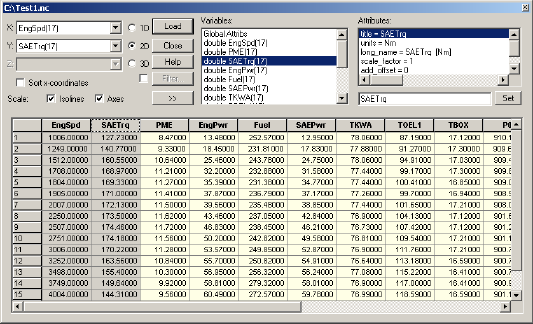
In the Import dialog box selected columns can now be frozen. The frozen columns are marked in gray and remain fixed on the left side of the grid while other columns are being scrolled.
To freeze columns, select one or more columns (hold down the CTRL key). Then click the right mouse button within the table to open the context menu. Choose the function Freeze Seclected Columns. To unselect the column, open the context menu and choose the function Unfreeze Columns.
When you open another NC-file, UniPlot will try to re-freeze the channels that used to be frozen.
You can now alter the size of the Import dialog box.
Click  to open the
box. Then use the mouse to alter the size of the dialog box’s border.
to open the
box. Then use the mouse to alter the size of the dialog box’s border.
New Dialog Element for the Function DialogBox
A report list (a list with columns) has been added to the DialogBox function. The following example is a report with three columns.
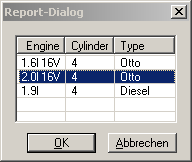
The accompanying call is as follows:
DialogBox(["|R4 Engine\tCylinder\tType    |", strempty(1,3)], ..
           "1.6l 16V\t4\tOtto|2.0l 16V\t4\tOtto|1.9l\t4\tDiesel@2.0l 16V\t4\tOtto", ..
           "Report-Dialog")
Open Date Files with the help of Explorer
By double clicking a NC-file in Explorer you can now open a NC-file in UniPlot. The NC-file must be registered in Explorer.
Open Windows-Explorer.
Click on a NC-file.
Chose Attributes from the File menu.
Choose Change.
Select the UniPlot program.
If you register VS100/Inca-files or UTX-files, UniPlot will convert them to NC-files and they will be shown in the Import dialog box.
Bug Fixes
The function GetDirectoryDialog returned invalid directory names when the name contained a period. This error has been corrected.
After printing, UniPlot switched the date format to the American format. The error has been corrected.
Better error messages will appear for user defined automation.
Field functions which accessed the SummaryInfo (File=>Summary Info) were not updated automatically when a document was opened. To update the field function you had to execute the function Edit=>Update Fields (F9). This error has been corrected.
id-1710941