2. Questions about UniPlot
2.1. I have problems saving a UniPlot file. What should I do ?
It is possible that there isn’t enough space available in the TEMP directory, even though there is enough free disk space where you want to save the file.
2.2. Can I create WMF files with UniPlot ?
Yes. To create a WMF file from a single document page choose File=>More File Functions. From the list box that appears, choose the command Save active page as a Windows-Meta-File (.wmf).
2.3. Can I create EPS files with UniPlot ?
Yes.
Choose File=>More File Functions the function EPS: Save document pages as EPS files. Before you use this function please read the help: File=>EPS/PDF-Export.
2.4. What is the difference between the interpolation methods in UniPlot ?
To calculate a matrix on a rectangular grid of scatted data, three gridding methods are used:
- linear interpolation of triangulated data.
- non linear interpolation (using polynoms)
- Thin-Plate-Spline Interpolation (using splines)
Pro and Cons of the three methods:
- Linear Interpolation
- Extrapolation is not possible. Little Memory is used. No overshoot.
- Non Linear Interpolation
- Extrapolation possible. For some datasets errors can occur at the edges of the measured data. Possibility of overshoot i.e. the gridded data may show values that are larger than the measured data. The interpolated data may incorporate oscillatory behavior.
- Thin-Plate-Spline-Interpolation
- Extrapolation possible. The interpolation method may fail for some datasets - the interpolation cannot be calculated. The interpolated data may incorporate oscillatory behavior.
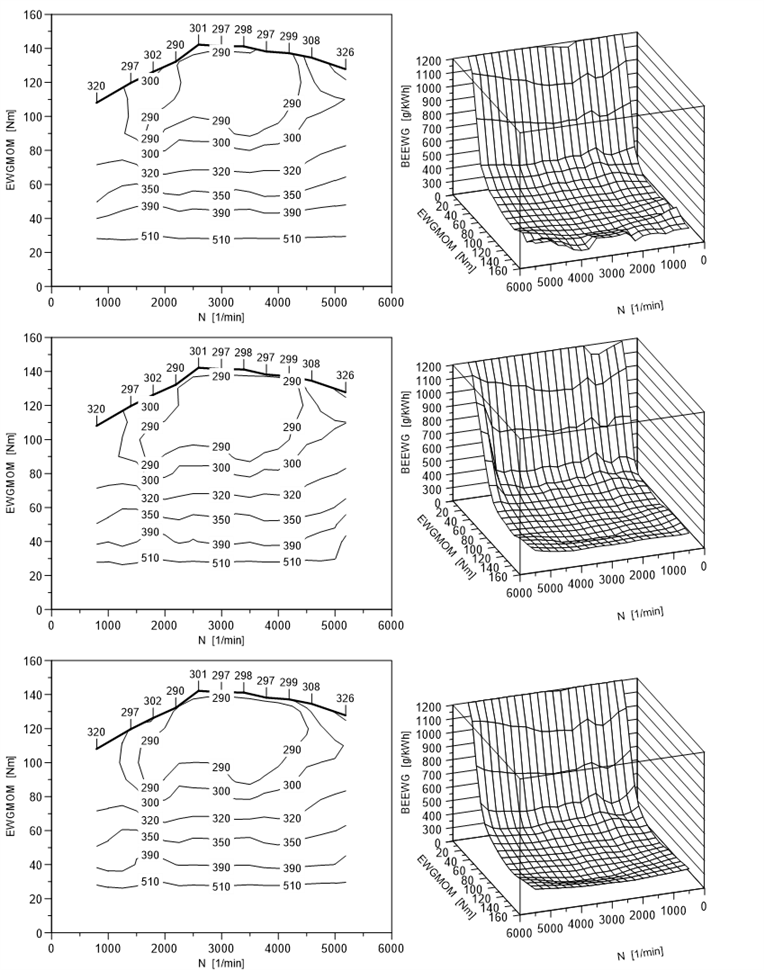
The following figure the two diagrams at the top display linear interpolated maps, the diagrams in the middle non linear interpolated maps and the diagrams at the bottom display Thin-Plate-Spline interpolated maps.
2.5. Can I create PDF files with UniPlot ?
Not directly. You need to have a tool like the Distiller from Adobe (http://www.adobe.com) or the free Ghostscript (see http://www.cs.wi.edu/~ghost/index.html).
- Select File=>Print from UniPlot. Select the PDF driver and specify a name for the UniPlot document.
- If you want to create a PDF file from a Word document, copy the UniPlot page to the clipboard and insert the page into your Word document.
- If you want to use a program that does not support Windows Meta Files (WMF) files directly you can create an EPS file.
2.6. How can I switch off the UniPlot StartUp box?
You need to edit the Windows-Registry:
Type the following command into UniPlot’s command window:
WriteProfileInt("Settings", "StartUp", 0);
The next time you start UniPlot the box will not appear. To switch it on again, type in the following command:
WriteProfileInt("Settings", "StartUp", 1);
2.7. What is a style file?
In a style file, attributes such as line style, color, width, marker type etc., will be saved to plot datasets. 1D and 2D datasets have approx. 50 attributes to choose from and 3D datasets have approx. 100 attributes. The attributes are saved in a style file under a name such as 2D-Red for example. A style file can contain as many 1D, 2D, 3D styles as you wish. In UniPlot, only one style file can be loaded at a time. The styles of the currently loaded file will be shown in the Toolbar Dataset Style box.
All style file editing functions are gathered in the Dataset Style dialog box. This dialog box can be opened by the command Tools=>Dataset Style Configuration. New style files can be created in this dialog box or available files opened.
For 3D datasets a style contains isoline values and fill colors as well as the standard plot attributes. Example: The isoline values 200, 210, 220, 300, 320, 340, 400, 500, 1000 for a fuel consumption map can be defined. The style can be used for script automation or for the manual data import.
2.8. How can I import an Excel file with columns of variable length?
The standard import filter expects that all columns are of equal length. If your sheet has rows with missing values or columns with different numbers of rows you can import the data with the UTX-filter. To do so you need to add some elements to your sheet. Look at the following example:
N      Mom  BE     TOel
1/min  Nm   g/kWh  C
1000   100  400    80
1500   200  250    90
2000   330         100
2500               95
To enable UniPlot to import the data with the help of the UTX-Import filter add the following 4 lines to the sheet so it looks like this:
UXX-BEGIN
Kanalname=$1
Einheit=$2
UXX-END
N      Mom  BE     TOel
1/min  Nm   g/kWh  C
1000   100  400    80
1500   200  350    90
2000        330    100
2500               95
Save your changes.
To import the Excel file:
- Choose File=>Import Data.
- For File Type choose UniPlot Data File.
- Choose your Excel File.
The UTX-Format supports other features. To find out more about the UTX-Format see UTX Data File Format in the online help system.
2.9. How can I hatch fill the area where the intake and exhaust valves overlay?
If the intake and exhaust valve curves have equal CA range (e.g. 0 degrees to 360 degrees) you can hatch fill the overlapping part as follows:
- Import the two curves into one diagram.
- Select the two curves. Hold down the SHIFT-key while clicking the curves.
- Choose File=>More File Functions and select the command 2D-Interpol: Create Sum./Diff… from the list that appears. From the dialog box that appears next choose the function Minimum of all selected datasets.
- A new curve will be created and added to the current diagram.
- Double-click the new curve and select a hatch style in the dialog box Data=>1D and 2D Dataset Properties.
You can also calculate the area of the overlapping part. Choose Data=>More Data Functions (2D) and from the list the function Data=>Compute area.
2.10. Convert Unix date to Excel date
The Unix date can be converted to Excel date using the following formula:
time = unixtime/86400 + 25569
The following listing contains a formula. Save the file in the formula directory, see Tools=>Formula Configuration. Open the file and set the channel names (Name with Unix date and name for Excel date). Press F4 and then choose Tools=>Update Formulalist.
// Unixtime -> Exceltime
//
def _fi_time(bInfo)
{
    ssUnixTime = "time_unix";    // <- Unix time channel name
    ssExcelTime = "time";        // <- Excel time channel name.
    if (bInfo) {
        return [ssExcelTime; ..
                ""; ..
                ""; ..
                ssUnixTime; ..
                ""; ..
                "%.1lf"];
    }
    ncid = get_ncid();
    if (ncid != -1) {
        varid = nc_varid(ncid, ssExcelTime);
        if (varid != -1) {
            if (nc_attinq_datatype(ncid, varid, "datatype") == -1) {
                nc_redef(ncid);
                nc_attput(ncid, varid, "datatype", NC_CHAR, "datetime");
                nc_endef(ncid);
            }
        }
    }
    _fich_unixtime = ch(ssUnixTime);
    _fich_time = _fich_unixtime ./ 86400 + 25569;
    set_ch(ssExcelTime, _fich_time, ssUnixTime);
}
2.11. How to control UniPlot from another Program?
The easiest way to control UniPlot from another application is using DDE (Dynamic Data Exchange). This example uses us.exe to control uniplot.
You can execute the example as following:
Copy the first script below (
control-uniplot.exe) onto your hard drive.Copy the second script below (
dde-command-line-server.ic) into the autoload directory of UniPlot.Open a command window
cmd.exe.Add the path of us.exe to your PATH enviroment variable
c:\Program Files (x86)\Uniplot Software\R2013-win64\programor type in the complete file name (in quotes if the path contains spaces).Execute the following comamnds:
us control-uniplot.ic open-document(d:/test1.ipz)

us control-uniplot.ic open-document(d:/test.nc2)

us control-uniplot.ic open-document(d:/test.xml)

us control-uniplot.ic full-screen(1)

us control-uniplot.ic full-screen(0)
or if you have spaces in the file names:
us control-uniplot.ic "open-document(d:/test1 name.ipz)"
The example only knows the comamnds open-document and
full-screen. New commands can be easly added, for example
close-document, close-uniplot, print-document.
1 2 3 4 5 6 7 8 9 10 11 12 13 14 15 16 17 18 19 20 21 22 23 24 25 26 27 28 29 30 31 32 33 34 35 36 37 38 39 40 41 42 43 44 45 | // control-uniplot.ic
def FindApp(ssApp)
{
RegConnect("HKEY_CURRENT_USER")
b = RegOpen("Software\\Classes\\" + ssApp + "\\CLSID");
s = RegGetValue("");
RegOpen("Software\\Classes\\CLSID\\" + s + "\\LocalServer32")
return RegGetValue("");
}
def main(svArgs)
{
// Is UniPlot already running?
hWindow = FindWindow(":UniPlot:", "");
if (hWindow == 0) {
// Starte UniPlot
print ssExe = FindApp("UniPlot.Application");
system(ssExe);
}
// Try to call DdeInitiate. Wait up to 10 seconds (UniPlot needs some time
// to start)
for (i in 1:20) {
hConv = DdeInitiate("up1", "system");
if (hConv == 0) {
Sleep(500); // wait 0.5 seconds
} else {
break;
}
}
if (hConv == 0) {
MessageBox("Error in uniplot-setup");
exit(-1);
}
// us control-uniplot.ic open-document(d:/test1.ipz)
DdeExecute(hConv, svArgs[3]);
DdeTerminateAll();
}
main(getargs())
exit(0);
|
Copy the following script to the file dde-command-line-server.ic into the
UniPlot autoload directory.
1 2 3 4 5 6 7 8 9 10 11 12 13 14 15 16 17 18 19 20 21 22 23 | // dde-command-line-server.ic
DdeNameService("up1")
def DdeCallback_Execute(hConv, ssItem, ssCommand)
{
sv = strtok(ssCommand, "(");
if (sv[1] == "open-document") {
s = strfindreplace(sv[2], ")", "");
OnOpenDocumentCallback_Default(s);
}
if (sv[1] == "full-screen") {
s = strfindreplace(sv[2], ")", "");
b = strtod(s)
AppSetFullScreen(b);
}
// more commands ...
return TRUE;
}
|
id-1662212