Map Calculator
Introduction
The Map Calculator can be used to calculate none equidistant matrices from measured maps or create a new channels in a given NC2 data file.
Matrix Calculation
The map can be saved as INCA-CSV file, a DAMOS file or as a Magneti-Marelli-CSV file.
The map can be inserted into the clipboard. From the clipboard can it can be inserted into an Excel sheet.
To calculate the matrix the selected interpolation method is used. If you need extrapolation, it is recommended to use the Thin-Plate-Spline method. See Data=>Interpolation.
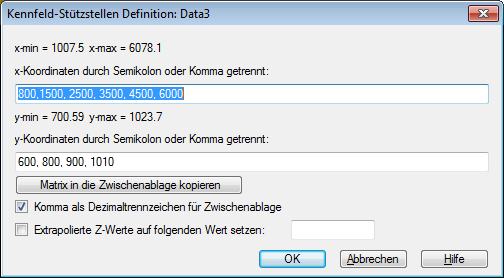
Usage Matrix Calculation
- Import a 3D dataset.
- Select the dataset.
- Choose Data=>More Data Functions. Choose the function “Map-Calculator” or right click the data set and choose the command “Map-Calculator”.
- In the following dialog box define the column and row values. Use a semicolon (;) or a comma (,) to separate the values.
- Choose OK.
- You will be asked for a file name to save the matrix. You can save the matrix as a Text-, Excel-, VS100/INCA Magneti-Marelli file or as a DAMOS file.
Z-Channel Calculation
This command can be used to calculate for a given x- and y-channel for a given NC file a new z-channel. The z-coordinates are interpolated for the given map. The new channel is saved in the NC file. If extrapolation is disabled, the z-coordinates for data points outside the convex hull are set to missing.
If the x- and y-channels have different number of data points, the new channel will be added to the dimension with the higher number of data points. This problem can occur with MDF files, were the x-and y-channels belong to different time groups.
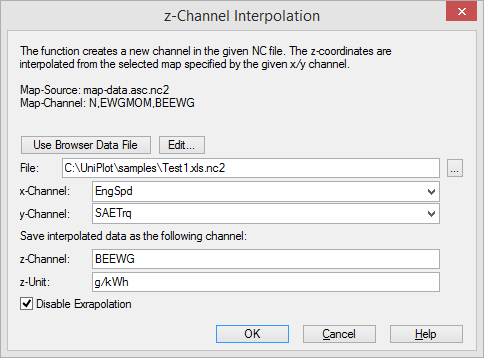
Usage Z-Channel Calculation
- Import a 3D dataset (map).
- Click on one of the iso lies to select the dataset.
- Choose Data=>More Data Functions (3D). From the following list choose the
command “Map Calculator: Add Z-Channel to NC file…”, or right click on an
iso line and choose das command
Map-Calculator: Interpolate Z-Channel.... - In the following dialog box choose a datafile containing the x/y data. Select the x- and y-channel. The units of the two channels should match the x- and y-units of the map, for example torque in Nm and speed in rpm.
- Type in a z channel name. The z-channel name from the map will be displayed as a suggestion.
- Select
No Extrapolation, if the z values should be calculated only inside the map. Values outside the map will be set tomissing. - Choose OK to start the calculation. The z channel will be added to the NC file.
- To open the NC file double lick on the file name in the event window.
Installation
- Choose Tools=>Add-In Manager.
- Check the “Map Calculator” addin.
- Choose OK. Restart UniPlot.
The installed files are located in the
C:\Program Files\UniPlot\AddIn\RS_3DCAL directory.
| rs_3dcal.ic | UniScript File |
| rs_3dcal.icl | rs_3dcal.ic in object code |
History
- 27.02.2015: (R2015.2) New Command: Map-Calculator: Save Z-Channel.
- 26.05.2014: New Option in R2014.15: Save matrix as a DAMOS file.
- 20.04.2011: New Option in R2012: Set extrapolated Z-Values to.
- 17.10.2005: New in UniPlot 5.
id-1853371